
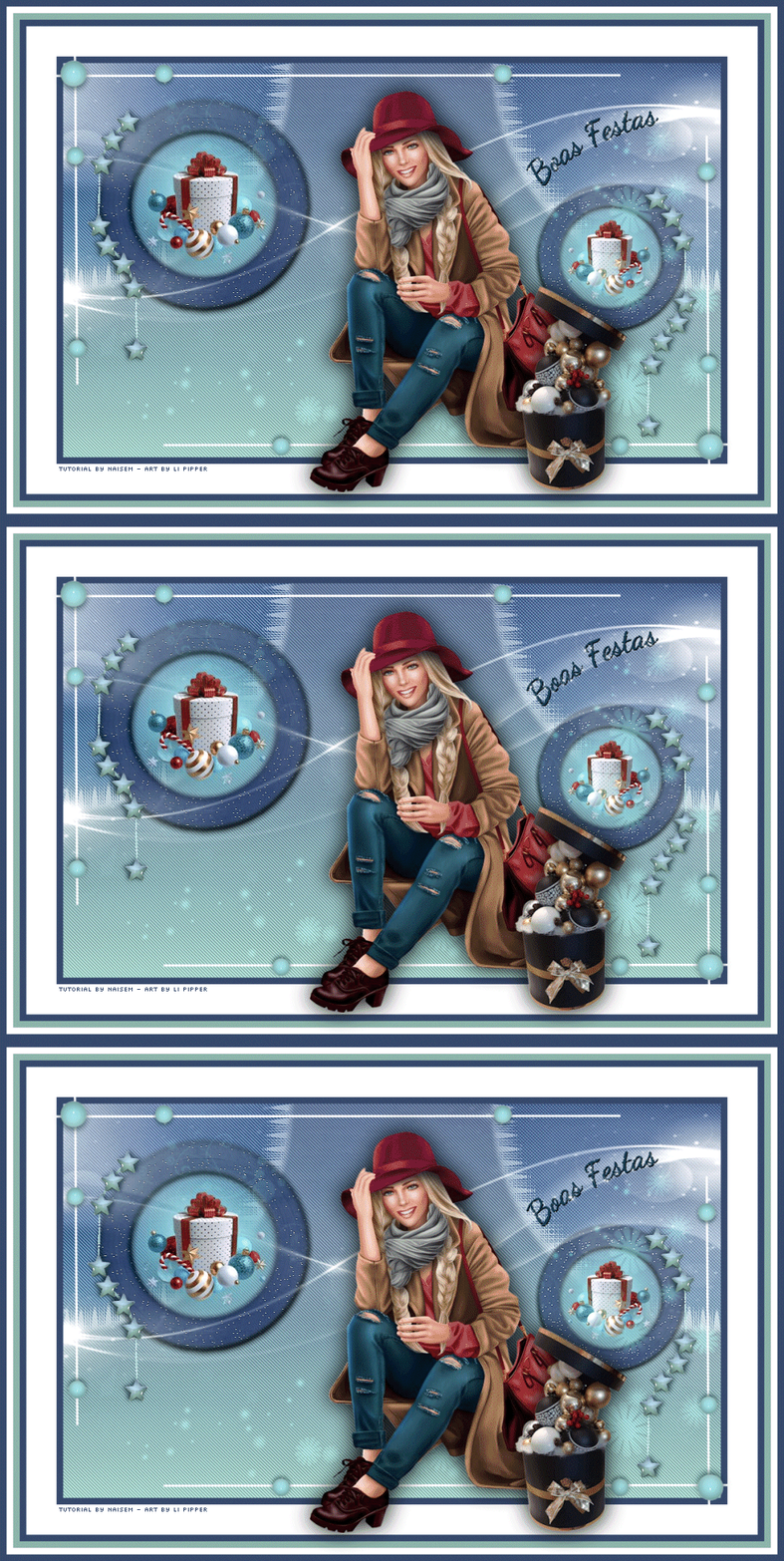
This tutorial was translated with permission from NaiseM, thank you very much!
*Original Tutorial*

MATERIAL

1 Main Tube of your choice
1 Misted Landscape of your choice
Selection Alpha Channel
PLUGINS
Unlimted - FunHouse - ZigZaggerate
Carolaine and Sensibility - CS-Dlines
Nick Sofhewere 3.0
Alien Skim Xenofex 2 - Constellation
Consult if necessary my filter section Here
Mask by Narah, Thanks.
Rest of NaiseM materials.
*You can change the blend mode according to your colors*
Colors used in this Tutorial:
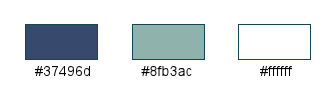
If you are using different colors you may need to colorize some of the original elements.
TUTORIAL
 |
This arrow marks your lineClick and drag to move it |
1_. Put the color #37496d in the Foreground and the color #8fb3ac in the Background
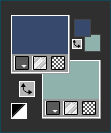
Open Alpha Channel, (alpha-boas-festas)
2_. Paint with Gradient formed by Foreground and Background, in the settings below:
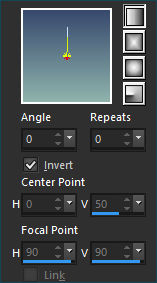
3_. Plugins - Carolaine and Sensibility / CS DLines, in the settings below:
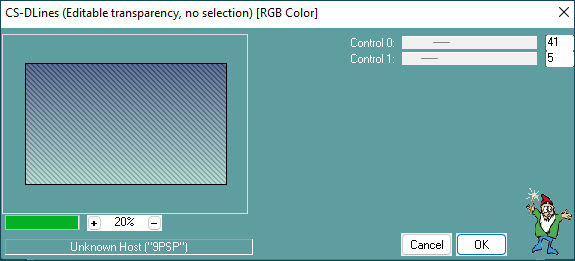
4_. Layers - New Raster Layer
Selections - Load/Save Selections / Load Selections From Alpha Channel: Selection #1.
Paint with color on the Foreground
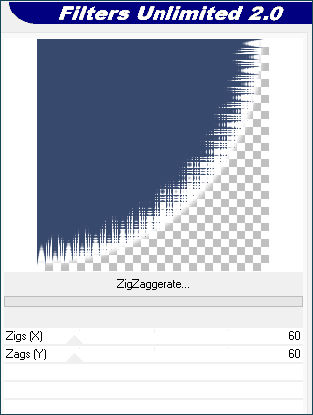
5_. Plugins - Unlimted - FunHouse - ZigZaggerate, in the settings below:
Plugins - Carolaine and Sensibility / CS DLines, in the same settings as before:
Selections - Select None
6_. Layers Duplicate
7_. Image - Mirror / Mirror Horizontal
Layers - Merge / Merge Down
8_. Blend Mode - Soft Light
9_. Layers - New Raster Layer
Paint it white (#ffffff)
10_. Layers – New Mask Layer / From Image: NarahsMasks_1250
Layers - Merge / Merge Group
11_. Layers Duplicate
Layers - Merge / Merge Down
12_. Layers - New Raster Layer
13_. Selections - Load/Save Selections / Load Selections From Alpha Channel: Selection #2
14_. Open the Misted Landscape
Edit - Copy
Edit - Paste Into Selection
15_. Selections - Modify / Select Selection Borders, in the settings below:
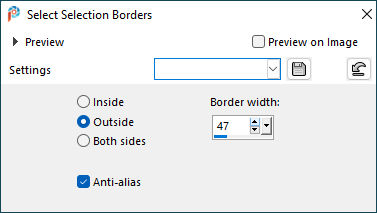
Paint with Foreground color (#37496d)
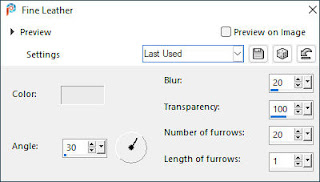
16_. Effects - Texture Effects / Fine Leather, in the settings below:
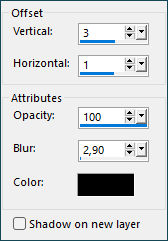
17_. Effects - Effects 3D / Drop Shadow: 3/1/100/2,90 (#000000) Black
Selections - Select None
18_. Layers Duplicate
Layers - Merge / Merge Down
19_. Layers Duplicate
Image - Resinze de 70% (Resize all layers unchecked)
Image - Mirror / Mirror Horizontal
20_. Activate Pick Tool (Letter K on your keyboard)
Position X: 715,00 - Position Y: 180,00 (Letter M to disable)
Layers - Merge / Merge Down
21_. Activate Layers Group Raster 2
Layer - Arrange / Bring to Top
22_. Layers - New Raster Layer
Paint with color on the Background (#8fb3ac)
23_. Layers – New Mask Layer / From Image: NarahsMasks_1240
Layers - Merge / Merge Group
Blend Mode - Hard Light (Or to your liking)
24_. Layers - Merge / Merge Visible
25_. Plugins - Nik Software - Color Efex Pro 3.0 Completo / Tonal Contrast, to your liking
26_. Open Deco nmcriacoes52, colorize according to your colors
Edit Copy
Go back to your work
Edit Paste As New Layer
27_. Activate Pick Tool (Letter K on your keyboard)
Position X: 32,00 - Position Y: 64,00 (Letter M to disable)
28_. Layers Duplicate
Image - Mirror / Mirror Horizontal
Activate Pick Tool (Letter K on your keyboard)
Position X: 867,00 - Position Y: 181,00 (Letter M to disable)
Layers - Merge / Merge Down
29_. Image - Add Borders / Symmetric
10 pixels - with Foreground color (#37486c)
46 pixels - with white color (#ffffff)
10 pixels - with Foreground color (#37496d)
10 pixels - with Background color (#8fb3ac)
10 pixels - with white color (#ffffff)
10 pixels - with Foreground color (#37496d)
30_. Open Deco nmcriacoes67, colorize according to your colors
Edit Copy
Go back to your work
Edit Paste As New Layer
31_. Activate Pick Tool (Letter K on your keyboard)
Position X: 40,00 - Position Y: 57,00 (Letter M to disable)
32_. Layers Duplicate
Image - Mirror / Mirror Vertical
Image - Mirror / Mirror Horizontal
Layers - Merge / Merge Down
33_. Decorate with the chosen tubes.
Apply your watermark or signature
*This part is from Liriani*
34_. Open Text
Edit Copy
Go back to your work
Edit Paste As New Layer
35_. Activate Pick Tool (Letter K on your keyboard)
Position X: 800,00 - Position Y: 168,00 (Letter M to disable)
36_. Selections - Select All
Selections - Float
Selections - Defloat
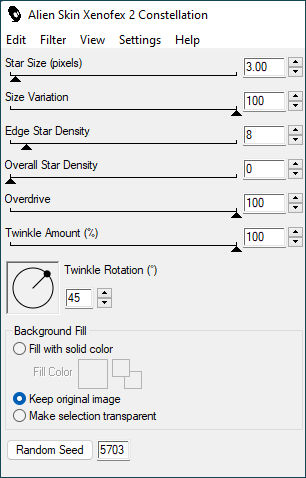
Plugins - Alien Skim Xenofex 2 / Constellation, in the settings below:
Select None
37_. Edit Copy Especial - Copy Mergedet
Take to Animation
38_. Paste As New Animation
39_. Go back to PSP
40_. Of two Undo
41_. Plugins - Alien Skim Xenofex 2 / Constellation, changing Radom Send
Select None
42_. Edit Copy Especial - Copy Mergedet
43_. Take to Animation
Paste After Current
Go back to PSP
Of two Undo
44_. Plugins - Alien Skim Xenofex 2 / Constellation, changing Radom Send
Select None
45_. Edit Copy Especial - Copy Mergedet
46_. Take to Animation
Paste After Current
Save as Gif.
Submit your version to place in the Gallery.
Here
My Version.

Translation Liriani Silva
14/12/2022